For KDP, Etsy and other marketplace sellers
Your puzzle book looks like everyone else's. Here's how to make one that doesn't.
PalabraPuzzle Studio makes printable English–Spanish word search books in a few minutes. Pick the themes, press one button, print to PDF, and upload. You keep the books you make, and you pay once.
Secure checkout by WarriorPlus, our merchant of record.
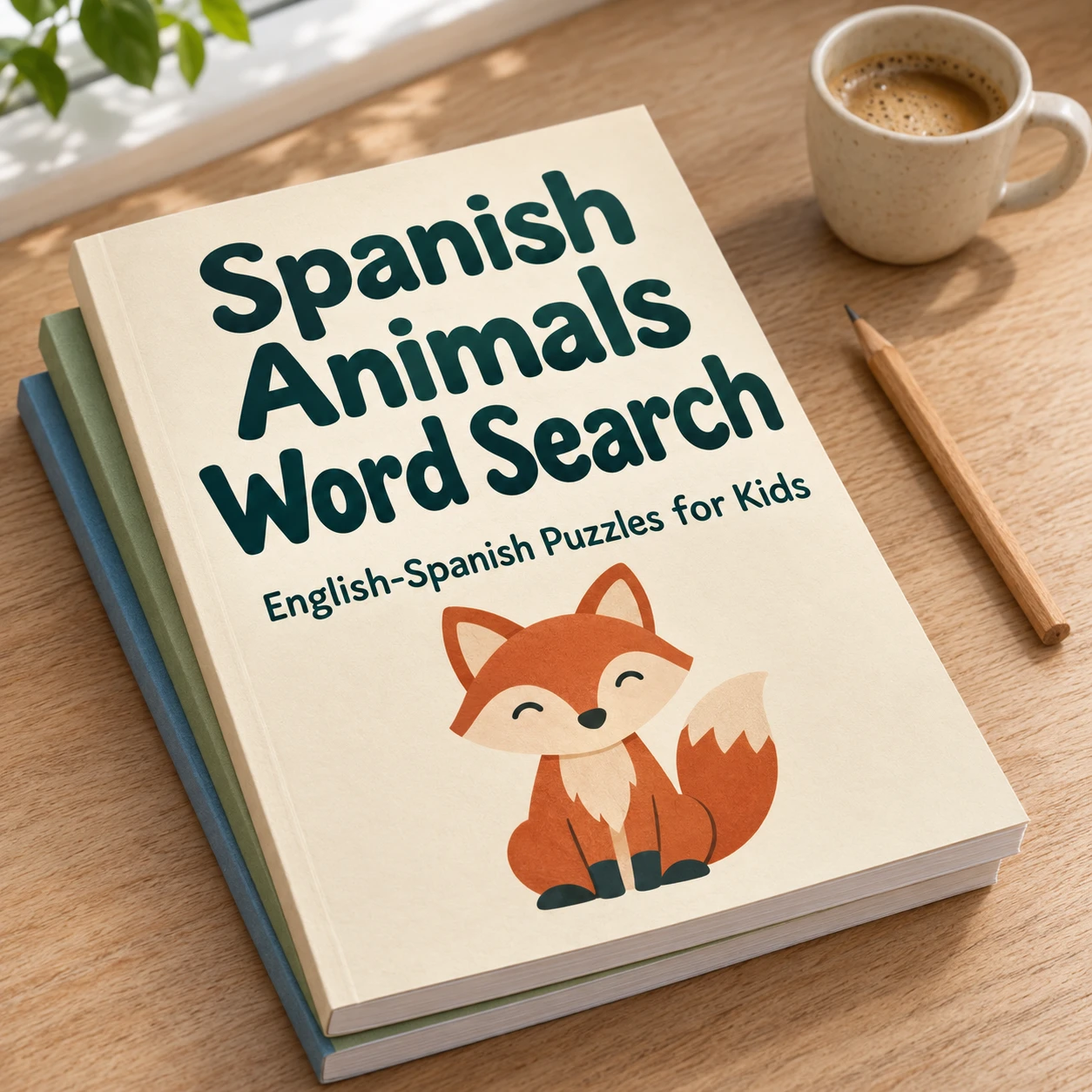
You already know the problem
You have spent hours on a puzzle book for Amazon KDP or Etsy. Maybe you made it by hand in a design tool, or you paid for a puzzle generator that charges every month whether you publish or not. Either way the work piles up: choosing words, placing them in a grid, checking that every word really fits, drawing the answer key, and fixing the pages that spill over the margin.
Many sellers then discover that the next book looks like the last one. The same animal words, the same grid, the same cover. Buyers notice. So do the marketplace algorithms that show books with a clear angle more often.
If that sounds familiar, this page is for you.
What PalabraPuzzle Studio does
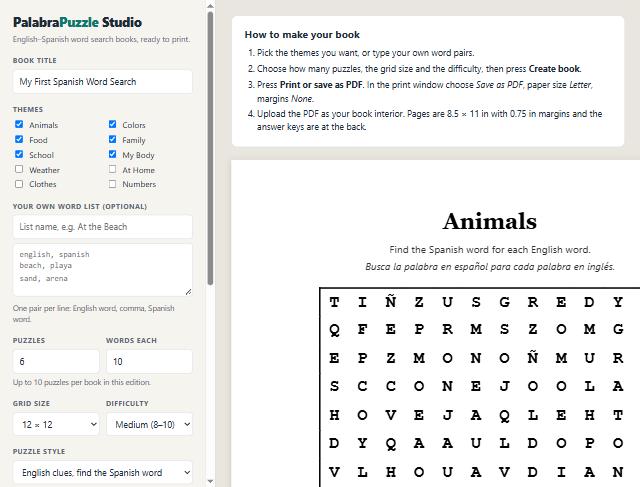
PalabraPuzzle Studio is a web app that generates word search books for you. You open it in your browser. There is nothing to install and no code to write. It runs on your own computer, so the books you make stay on your device until you print them.
- Creates a complete word search book: each puzzle is a grid of letters with the hidden words placed in it.
- Writes the clue list in English and the answer in Spanish, or shows both words, or flips the direction for advanced learners.
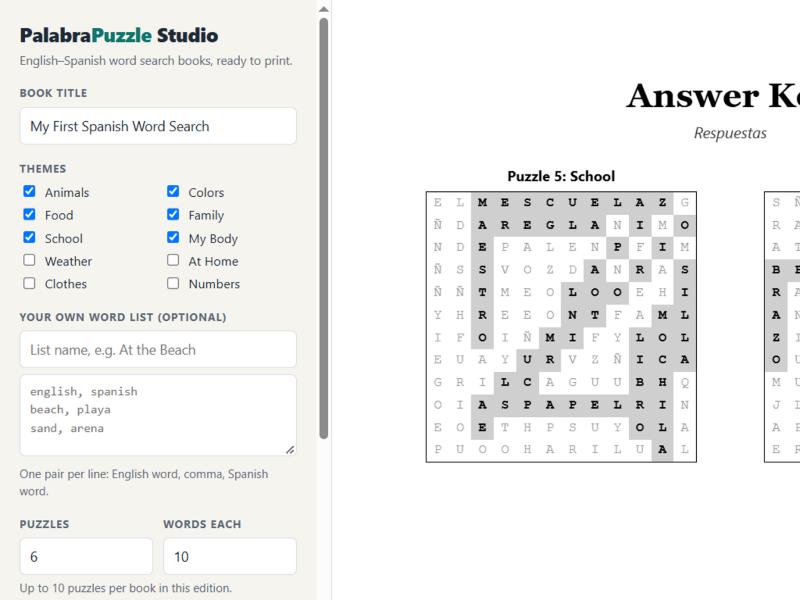
- Adds an answer key at the back of the book, four puzzles per key page, with the solved words shaded.
- Formats every page for 8.5 × 11 inch paper with a 0.75 inch margin, so the book is ready for upload.
- Lets you add your own word list, so you can build a book around your niche, a holiday, a school topic or a client's brief.
- Does not charge you for an AI service. The word search is built by the app itself, so your costs stop at the purchase price.
Built for bilingual learners
Spanish–English puzzles are popular with parents, teachers and homeschool families. Most of the word search books on the marketplaces are English only. A bilingual book gives the child two things at once: a puzzle to finish and a vocabulary to practise. That is an easy story to tell in your listing, and it is a real reason for a buyer to choose your book.
The starter edition includes English–Spanish pairs across ten everyday themes: animals, colours, food, family, school, the body, weather, the home, clothes and numbers. You can add your own word list on top of the built-in ones.
Who this is for
PalabraPuzzle Studio is a tool for sellers who publish printable books and digital downloads. It fits well if you already sell, or plan to sell, on:
- Amazon KDP, where word search and activity books are a steady category.
- Etsy, where printable activity packs sell to teachers, parents and gift buyers.
- Other marketplaces and your own store, where a printable PDF is an easy product to sell.
It is also useful if you run a small publishing business and want to test a niche quickly, or if you make books for a client who wants a custom word list.
How it works in four steps
1. Choose your themes
Tick the themes you want, or type your own list of word pairs. One pair per line is enough: an English word, a comma, and the Spanish word. The preview updates as you change the settings.
2. Set the book
Choose how many puzzles the book contains, how many words each puzzle holds, the grid size from 10 × 10 up to 15 × 15, and the difficulty. The starter edition makes books of up to ten puzzles. Easy grids suit young children. Hard grids with words in every direction suit older learners.
3. Pick the puzzle style
Show the English clue and ask for the Spanish word. Show both words so the child can learn them. Or reverse the direction and give the Spanish clue. Each style prints its own instructions in both languages.
4. Print to PDF and upload
Press Print or save as PDF, choose Letter paper and margins set to None, and save. Upload the PDF as the book interior. The answer key is already at the back, so you do not need a separate file.
What is included in this purchase
You get the full starter edition of PalabraPuzzle Studio:
- Word search generator with English–Spanish word pairs.
- Ten built-in themes, plus unlimited custom word lists.
- Three puzzle styles and four difficulty and grid-size combinations.
- Automatic answer key pages.
- Print layout for 8.5 × 11 inch paper.
- Updates to the starter edition, when we release them.
What is not included
We would rather you know this before you buy. The following are sold separately, after your purchase, if you want them:
- Unlimited Books: 40 more themes and up to 100 puzzles in one book.
- Language Pack: the same books in French, German, Italian and Portuguese.
- Puzzle Types and Covers: crossword, word scramble and matching puzzles, plus a cover page.
The app does not create cover art, illustrations or marketing copy for your listing. You need to write your own title, description and keywords, and check the books for accuracy before you sell them.
Before you upload: a short checklist
A puzzle book is simple to make but easy to get wrong. Most mistakes are small, and they are the kind of thing a buyer notices and reports. Before you upload any book, go through this list.
- Check every word pair. Read the English and the Spanish side by side. Look for words that were translated in the wrong sense, for accents you need to keep, and for plurals that do not match.
- Check the grid. Open the answer key and confirm that every word on the clue list is shaded. If a word is missing, change the grid size or remove a long word, then create the book again.
- Check the pages. Open the PDF in a reader and scroll through it. Make sure no page is cut off at the margin and that the answer key is at the back.
- Check the title and the instructions. The book title should match your listing. The instructions at the top of each page should tell the child what to do.
- Check the rules. Make sure your listing does not promise results, does not name a trademark you do not own, and follows the marketplace guidelines for activity books.
Make your listing specific
A word search book with a clear purpose sells better than a generic one. Instead of "Spanish word search for kids", describe who the book is for and what they will do with it. A family learning Spanish at the kitchen table, a teacher preparing a vocabulary week, or a grandparent who wants a quiet activity each morning. Each reader sees a book that was made for them.
Put the key words in your title and in the first lines of your description, and use the search terms that buyers really type. Look at the bestseller lists in your category before you choose them. Then write a description that explains the bilingual angle, the number of puzzles, the grid sizes and the answer key. Honest detail helps the right buyer say yes.
Keep the same look across a series. When your second and third books share a layout, a buyer who liked the first one can find the rest easily. The app makes the layout consistent for you, so the work is in choosing themes that belong together.
What you would pay elsewhere
Puzzle tools come in many forms. Some are monthly subscriptions. Some are one-time programs. Some are credit packs. Here is what we found when we checked published prices on the sites of comparable tools. These are estimates, not a guarantee that any tool will do the same job as ours.
| Puzzle book generator, 12 months at the lowest paid tier we found (about $9.99 a month) | $120 |
| Crossword generator with a commercial licence, one-time purchase | $39 |
| Unlimited Books edition: 40 more themes and up to 100 puzzles per book (our own price) | $27 |
| Total at those prices | $186 |
Comparable prices were taken from published vendor pricing pages and review sites. They change often, so check them before you decide. The price you pay today is $17, one time.
Frequently asked questions
Do I need to install anything?
No. The app opens in Chrome, Edge or another modern browser. You only need an internet connection to load the page and to activate your purchase.
Do I need to know any code or design software?
No. If you can fill in a form and press a button, you can make a book. For cover design you will still use your own tools or a designer.
Can I sell the books I make?
Yes. The books you create are yours, and you can sell them on KDP, Etsy or anywhere else. You may not resell the app itself or its word lists as a product. The full rules are in the Terms.
Do I have to check the Spanish?
Yes, you should. The word pairs and translations were written carefully, but no tool is perfect. Before you publish, read through a few pages yourself, and ask a Spanish speaker to check any book you plan to sell. Your buyers will notice a mistake.
Will my books be accepted by KDP or Etsy?
We cannot promise that. Each marketplace has its own rules for content and listings, and they can change. Check the current guidelines of the marketplace before you upload.
How many books can I make?
As many as you like. The starter edition makes books of up to ten puzzles each. Premium editions raise that limit.
Does it work on a phone or tablet?
You can open the editor on a phone or tablet, but we recommend a computer. Printing the PDF and checking the pages is easier on a larger screen.
Can I see the app before I buy?
The screenshots on this page show the real app screens. Read the steps above to see exactly what you will do after purchase.
What if I need help?
Email thaite.kdp@gmail.com. We aim to reply within two business days. The Support page lists common problems and their fixes.
What does the refund policy say?
You can ask for a full refund within 14 days of your purchase. Details are in the Refund policy.
Important: no income promise
PalabraPuzzle Studio is a tool. We do not promise that you will earn any money, sell any number of books, or make a profit. Results depend on many things you control and many you do not, including your niche, your listing, your marketing, your pricing and the competition on each marketplace. Nothing on this page is financial, legal or publishing advice.
Please read the Disclaimer before you buy. It explains how we handle affiliate links, testimonials and accuracy of content.
Your risk is covered
If the app does not do what this page describes, email us within 14 days and we will refund your purchase in full. We do not ask you to justify the request. The full process is in the Refund policy.